
 1/10
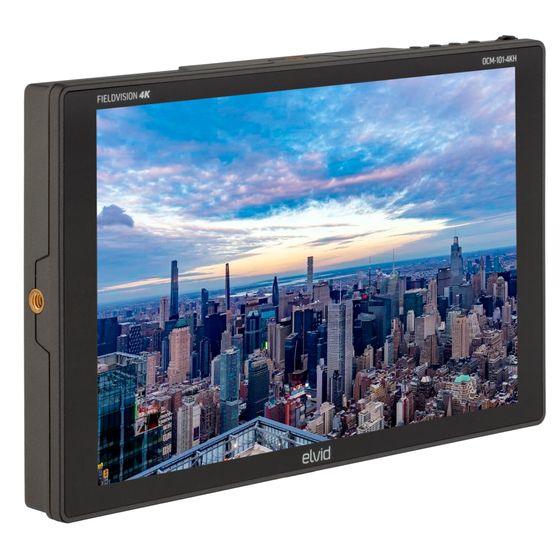
1/10FieldVision 10.1" LCD HDMI Monitor
MFR #OCM-101-4KH
Availability: In-Stock
Key Features
- 10.1-inch 1920 × 1200 IPS LCD screen
- 4K HDMI and VGA inputs
- HDMI loop output
Overview
The Elvid FieldVision OCM-101-4KH puts a large, bright, and lightweight 4K monitor right on top of your camera, but it only adds one pound to your camera setup. Unlike the tiny integrated screens of DSLR and pro video cameras, the feature-rich FieldVision 10.1-inch monitor delivers a vibrant picture that you don’t have to squint at to see. And the monitor features professional focusing and monitoring tools that ensure the images you capture are flawless. The FieldVision OCM-101-4KH can display signals up to UHD 4K (3840 × 2160) and DCI 4K (4096 × 2160) for a picture that’s surprisingly sharp for a monitor this size. Advanced tools like Check Field help calibrate the monitor, and a dedicated DSLR menu mode scales and positions the incoming video signal when shooting with a DSLR. And turn on pixel-to-pixel mode when you need to inspect the fine details of your image. The intuitive on-screen menus make it easy to adjust your image, and they offer adjustments to fine tune display settings, as well as broadcast-specific features like safety frame markers and multiple display formats. Two programmable function buttons provide quick shortcuts to the tools you want at your fingertips so you can change settings on the fly without interrupting your workflow.
Features
Full HD Display
The OCM-101-4KH monitor boasts a spectacular and vibrant picture. A native resolution of 1920 × 1200, 1000:1 contrast ratio, and 350-nit brightness offer superb resolution and precise color rendering. The 10.1-inch IPS LCD screen gives you a larger picture but only weighs a few ounces more than an average 7-inch monitor.
HDMI Input and Loop Output
The OCM-101-4KH monitor accepts HDMI signals so you can connect it to a DSLR camera, camcorder, or pro video camera. The monitor’s loop output gives you the option of outputting an unmodified signal to a second monitor, recorder, or video switcher.
Programmable Function Buttons
Two programmable function buttons let you create shortcuts to the most frequently used tools. This lets you quickly access broadcast-specific functions, as well as the features you need to fine-tune your image, with a single press of a button.
On-Screen Menus
The monitor is loaded with menus that let you fine-tune your image, adjust broadcast functions, and tweak the operating system to match your preferences and specific needs. The intuitive menu structure is fast and easy to access, and adjustments can be implemented on the fly, so you don’t have to interrupt your shoot.
Peaking Focus Assist
One of the many functions that will help you sharpen and define the on-screen image, the peaking feature adds a color outline to high-contrast areas of your image and highlights the areas that are in focus.
Monitoring Tools
The OCM-101-4KH comes with monitoring tools to analyze your image, including false color, histogram, and exposure (zebras).
Runs on AC or DC Power
The OCM-101-4KH monitor will come with you, even to an extended shoot outside the studio. The monitor runs on an NP-F battery, and when an outlet is available, you can use the included power adapter.
Included Sun Hood
The included sun hood quickly attaches to the monitor to block out stray light and prevent glare. It’s indispensable when shooting outdoors and in other brightly lit environments.
Mounting Options
The monitor’s 1/4-20 sockets are located on all four sides of the monitor so you can mount it in the orientation you prefer. Use the included shoe-mount ball head to attach the monitor to nearly any bracket or mounting system.
UPC: 847628039391