
 1/10
1/10USB Boundary Microphone w/ HP Out
MFR #US-OB-55
Availability: In-Stock
Key Features
- For videoconferencing and home recording
- Omnidirectional polar pattern
- Built in analog-to-digital converter
Overview
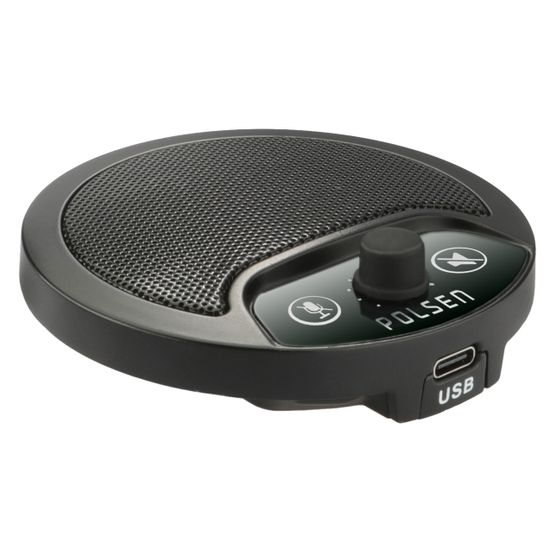
Polsen’s US-OB-55 Omnidirectional USB Boundary Microphone plugs into to your computer’s USB port, and it allows you to sit comfortably and talk normally during video conferences and calls. It’s a step up from your computer’s internal microphone when it isn’t practical to add a large microphone or headset to your setup. This microphone sits unobtrusively on your desk, and it substantially improves the quality of your audio output. The internal A/D converter boasts a 24-bit and 48 kHz sample rate for accurate, high-quality sound. The US-OB-55 couldn’t be easier to use. It runs off the power from your computer’s USB port, and it supports plug and play, so no additional software is needed. The microphone features a headphone jack and convenient touch-sensitive mic and speaker mute buttons that let you manage incoming and outgoing sound.
Features
Boundary Microphone
You’ve probably experienced dropouts, feedback, and poor audio quality with your computer’s internal microphone—and at the worst possible moments. The US-OB-55 adds reliable, CD-quality sound to your video meetings for you and any participants sitting around the microphone.
Omnidirectional Polar Pattern
The microphone features an omnidirectional polar pattern that uniformly picks up sound 360 degrees around the microphone. You can sit comfortably at your desk, look around if you like, and not focus on speaking directly into the microphone. Set it in the center of a table, and all participants seated around the mic will be clearly heard.
CD-Quality Sound
US-OB-55 has an internal A/D converter, so no additional audio gear, like an A/D interface, is necessary to use the mic. It boasts a sample rate of 24-bit 48 kHz for accurate, CD-quality sound.
Headphone Output
In a crowded office, there are times when you want to keep the audio portion of your conference or meeting to yourself. When you need some privacy, or don’t want to disturb anyone else in the room, plug headphones into the standard 1/8 in. headphone jack.
Touch-Sensitive Mute Switches
Some people call them mutes. Some people call them panic buttons. Whatever you call them, the touch-sensitive mute switches give you control over the incoming and outgoing audio. When you don’t need to hear what’s going on, use the speaker mute. And when you need to mute the microphone to have a side conversation, use the microphone mute. Both mute switches operate silently, so the other participants won’t know you’re muting and unmuting your speaker or mic.
Plug and Play
Plug the US-OB-55 into an available USB port on your desktop or laptop computer, and you’re ready to go. You won’t need to wait for software to download to start using the microphone.
USB Output
The US-OB-55 is bus powered, so you don’t need to connect a power cable or install batteries. Attach the microphone to your computer with the included cable, and you’re ready to go.
Rugged Metal Construction
This boundary mic’s all-metal construction is made for repeated use in demanding conference room and office environments. It’s also solid enough to take with you when you’re on the go, and it will withstand bumps when you pack it in your computer case.
UPC: 847628044777