
 1/3
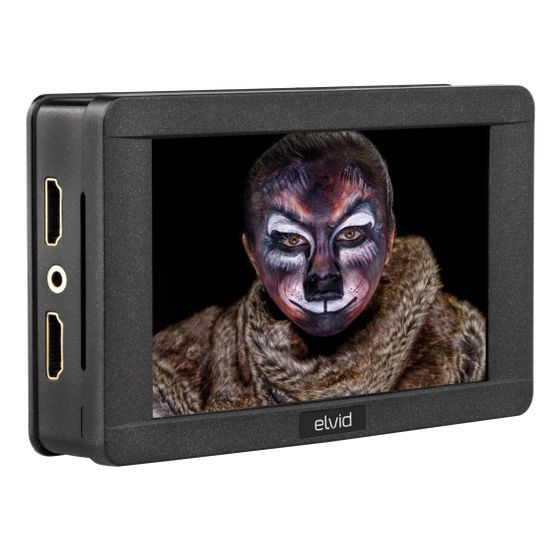
1/3RigVision 5" HDR On-Camera Monitor
MFR #RVM-5P-HDR
Availability: In-Stock
Key Features
- 1920 × 1080 native resolution
- Touchscreen LCD
- Four configurable function buttons
Overview
The compact and lightweight full-HD RVM-5P-HDR is a feature-rich on-camera monitor that delivers extremely sharp images whether you’re shooting with a DSLR or a pro camcorder. It boasts a touchscreen LCD panel that allows you to access menus and control functions. In addition, a simple double-tap on the screen activates 1:1 pixel mode that offers a view of your video at full resolution. And you can zoom in and out of your shot with the same pinch gesture you use with a smartphone or tablet. All the functions and menu items are also accessible with the onboard controls. The RVM-5P-HDR monitor supports a wide range of video signals and is equipped with HDMI input and output ports. It offers a wide viewing angle for an easy-to-see image, even if you’re not standing directly in front of the monitor. And an audio meter and a headphone output allow you optimize your audio levels while you monitor them. A swing arm is included for mounting onto a gimbal, camera cage, or your camera itself. The monitor is powered by a single NP-F battery, and the battery plate includes an integrated DC output and dummy battery to power your camera.
Features
Clear and Accurate Display
The RVM-5P-HDR’s native resolution of 1920 × 1080, will display all the details of your incoming video with superb clarity. Unlike older TFT screens, the IPS LCD panel won’t distort colors when viewing from off-angles. The monitor also can display an HDR (high dynamic range) signal for incredible clarity and detail.
High Brightness Monitor
The RVM-5P-HDR's peak brightness of 1500 nits makes it a perfect choice when you’re working outdoors. The monitor will provide you with a clear and crisp picture, even for daylight viewing.
HDMI Input
The HDMI input allows you to use the monitor as a wired high-definition video monitor, so you can connect it to your HD video camera or DSLR.
Onboard Controls
The RVM-5P-HDR is designed with intuitive controls that are easy to use so you can access menus, adjust settings, and configure your monitor quickly and effortlessly.
Intuitive Menus
The intuitive menu structure lets you access functions and viewing modes quickly and effortlessly. Select options and change viewing modes on the fly, without interrupting your shoot.
Touch-Screen Control
When you activate the touch screen function, you can access many of the monitor’s functions from the screen. Use the same gestures you use with your smartphone or tablet to zoom in, zoom out, move the image, and select functions.
Focus Assist
When you need to fine-tune your picture, the peaking filter adds a colored outline to any sharp edge, so you easily can see which parts of the image are in focus.
Pixel-to-Pixel Mode
Pixel-to-pixel mode is another feature for focusing accuracy that allows the monitor to display a signal at a 1:1 resolution without any scaling or processing. This is a particularly useful function when the incoming video resolution is higher than the RVM-5P-HDR’s resolution, like a 4K signal. Activating pixel-to-pixel mode zooms in to let you view your picture with great sharpness and in fine detail.
Center Marker and Safety-Frame Overlays
Broadcast-specific features include a center marker and an onscreen box that functions as a safety-frame marker at a set percentage of the screen size.
Check Field Mode
One of several included tools to perfect your picture, the Check Field mode helps you accurately calibrate the monitor by displaying only the selected color onscreen. Choose from red, green, or blue.
Flip Control
Flip control allows you to adjust the picture if you have to mount your monitor upside down, or if an adapter changes the orientation of the image.
Zebra Mode
For even greater control over your image, the zebra mode displays animated black and white stripes through areas of the image that are overexposed.
Programmable Function Buttons
Four programmable function buttons let you create shortcuts to the functions you use most often. This lets you quickly access broadcast-specific functions as well as the features you need to fine-tune your image.
Camera Control
You won’t have to come out from behind the monitor because you can configure select cameras directly from the touch-screen. With the addition of a camera control accessory (available separately,) you can adjust aperture, focus, and ISO functions, and start recording. You can also trigger the camera from the screen if you want to take a still of your scene.
Audio Monitoring
Monitor the incoming audio signal from the 3.5 mm headphone jack, and display onscreen audio meters to monitor audio levels while you record.
UPC: 847628018266